Guide complet : creer des photos produit e-commerce professionnelles avec l'IA en 2026
Reponse rapide
La photographie produit par IA permet de creer des images e-commerce professionnelles en 15 secondes au lieu de plusieurs heures. YourRender.ai propose ce service a partir de 0,24EUR par image (contre 500-2000EUR pour une seance photo traditionnelle). Avantages cles : aucune competence design requise, resultats instantanes, qualite studio professionnelle. Vous recevez 150 credits gratuits pour tester.
Aller a : Qu'est-ce que la photo produit IA ? | Tutoriel pratique | ROI pour e-commerce
Introduction

Le probleme : Vous vendez sur Shopify, Amazon ou Etsy. Vos produits sont excellents, mais vos photos ne leur rendent pas justice. Un photographe professionnel ? 500 a 2000EUR la seance. Apprendre Photoshop ? Des mois de formation. Resultat : vous publiez des photos smartphone qui font fuir les acheteurs.
La realite du e-commerce en 2026 : 75% des decisions d'achat en ligne reposent sur les visuels produit. Une mauvaise photo peut reduire vos conversions de 30 a 60%. Et 22% des retours sont dus a des produits qui "ne ressemblent pas a la photo".
La solution : L'intelligence artificielle genere maintenant des photos produit de qualite studio en quelques secondes. Plus besoin de photographe, de studio, ni de competences techniques. Ce guide vous montre exactement comment faire, etape par etape.
Ce que vous allez apprendre :
- Comment fonctionne la photo produit par IA (concepts de base)
- Comment creer votre premiere image professionnelle (tutoriel pratique)
- Comment optimiser vos listings Shopify, Amazon et Etsy
- Comment calculer vos economies reelles
Qu'est-ce que la photographie produit par IA ?
Definition simple

La photographie produit par IA utilise l'intelligence artificielle pour transformer une simple photo de votre produit en image professionnelle. Vous uploadez une photo prise avec votre smartphone, l'IA supprime le fond automatiquement, puis genere un decor professionnel (studio blanc, scene lifestyle, ambiance luxe, etc.).
Analogie : C'est comme avoir un photographe professionnel, un directeur artistique et un retoucheur Photoshop dans votre poche - disponibles 24h/24, pour une fraction du cout.
Comment ca fonctionne (en 4 etapes)
- Upload - Vous telechargez votre photo produit (qualite smartphone suffit)
- Detourage automatique - L'IA isole votre produit de son fond original
- Choix du style - Vous selectionnez l'ambiance souhaitee (studio, lifestyle, exterieur)
- Generation - L'IA cree une image professionnelle en 10-15 secondes
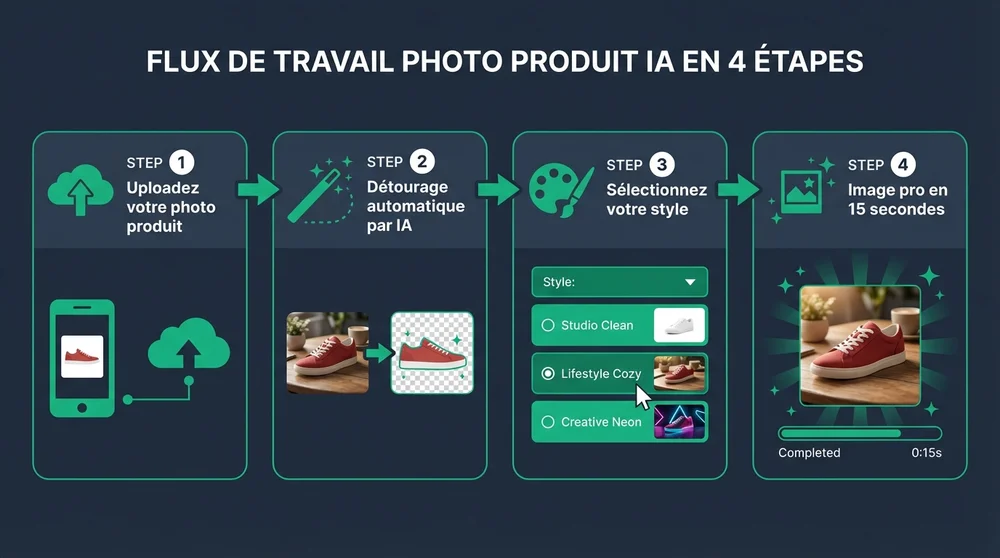
Les 4 etapes de creation d'une photo produit par IA
Pourquoi c'est revolutionnaire pour le e-commerce
Avant l'IA (methode traditionnelle) :
- Seance photo : 500-2000EUR
- Delai : 1-3 semaines
- Retouches : 50-100EUR par image
- Modifications : nouveau shooting = nouveaux frais
Avec l'IA (methode 2026) :
- Cout : 0,24EUR par image
- Delai : 15 secondes
- Retouches : incluses (regenerez jusqu'a satisfaction)
- Modifications : illimitees
Statistique cle : Les entreprises utilisant la photo produit IA reduisent leurs couts de production visuelle de 60 a 80% (source : etude Shopify 2025).
Ce que vous pouvez creer avec l'IA
Les 4 types de photos e-commerce essentielles
Avant d'aller plus loin, comprenons les types de photos dont vous avez besoin pour vendre en ligne :
1. Photo fond blanc (obligatoire)
Le fond blanc pur (code couleur #FFFFFF) est exige par Amazon, eBay et la plupart des marketplaces. C'est votre image principale.
Exigences Amazon 2026 :
- Fond blanc RGB 255,255,255
- Produit occupant 85% du cadre
- Resolution minimum 1000 pixels
- Format JPEG ou PNG
L'IA genere automatiquement des fonds blancs conformes a ces exigences.
2. Photo lifestyle (recommandee)
La photo lifestyle montre votre produit dans un contexte d'utilisation reel : une tasse de cafe sur un bureau en bois, une creme sur une etagere de salle de bain, un bijou porte.
Pourquoi c'est important : Les photos lifestyle augmentent le temps passe sur la page de 40% et les conversions de 25%.
3. Photo d'ambiance (differenciation)
La photo d'ambiance cree une emotion : eclairage dramatique, decor luxueux, mise en scene artistique. Ideale pour les reseaux sociaux et les publicites.
4. Photo de detail (confiance)
La photo de detail zoome sur les textures, les finitions, les caracteristiques specifiques. Elle rassure l'acheteur sur la qualite.
Le Scene Builder : creer des photos pro sans ecrire de "prompt"
Qu'est-ce qu'un prompt ?
Un prompt est une instruction ecrite que vous donnez a l'IA pour lui decrire l'image souhaitee. Par exemple : "Photo professionnelle d'une bouteille de parfum sur marbre blanc avec eclairage studio doux, arriere-plan flou beige".
Le probleme : Ecrire de bons prompts demande de la pratique. Un mauvais prompt = une mauvaise image.
La solution : le Scene Builder
Le Scene Builder est un outil gratuit de YourRender.ai qui genere automatiquement des prompts professionnels. Vous ne tapez rien - vous selectionnez simplement :
- Votre objectif marketing (e-commerce, reseaux sociaux, publicite)
- Le style visuel (studio epure, lifestyle chaleureux, luxe premium)
- L'ambiance (naturelle, dramatique, minimaliste)
Le Scene Builder combine ces choix pour creer un prompt optimise. Vous obtenez une photo professionnelle sans aucune connaissance technique.
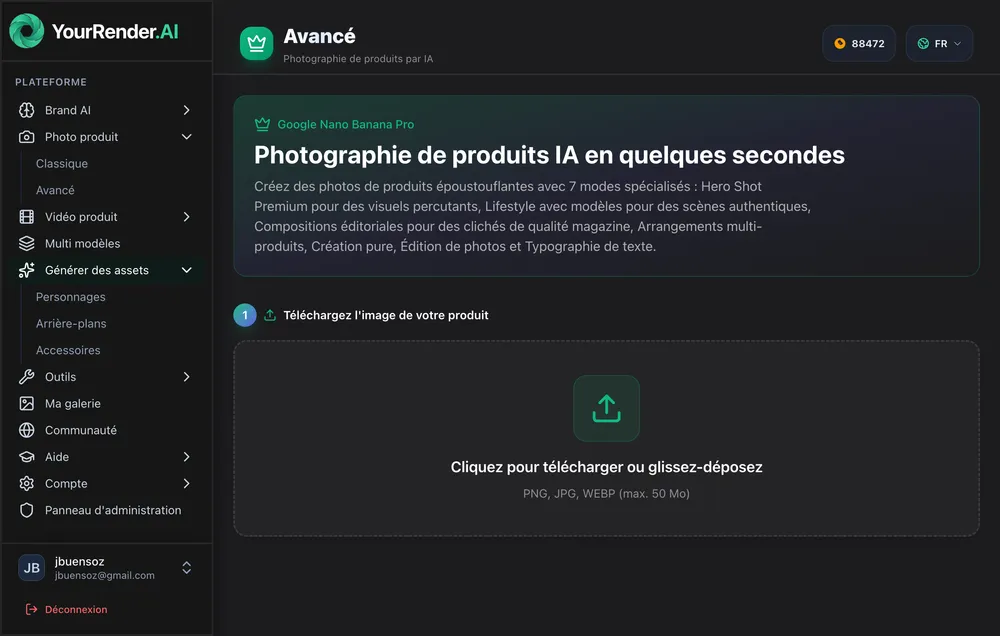
Le Scene Builder : selectionnez vos options, l'IA fait le reste
Exemple concret : Marie vend des bougies artisanales sur Etsy. Elle uploade une photo de sa bougie prise sur sa table de cuisine. Dans le Scene Builder, elle selectionne :
- Objectif : E-commerce
- Style : Lifestyle cosy
- Ambiance : Chaleureuse
En 15 secondes, elle obtient sa bougie photographiee sur une table en bois rustique, avec une lumiere doree de fin de journee et un arriere-plan flou de salon confortable.
Votre premiere photo produit IA en 5 etapes
Prerequis
- Une photo de votre produit (smartphone suffit)
- Un compte YourRender.ai (gratuit, 150 credits offerts)
- 2 minutes de votre temps
Etape 1 : preparer votre photo source
Bonnes pratiques pour la photo d'origine :
- Eclairage naturel (pres d'une fenetre) ou lumiere uniforme
- Fond neutre (mur blanc, table unie) - l'IA le supprimera
- Produit net et bien visible
- Plusieurs angles si possible
Ce qui fonctionne :
- Photo smartphone recent (2020+)
- Resolution minimum 1000x1000 pixels
- Format JPG, PNG ou WebP
A eviter :
- Flou de bouge
- Ombres dures
- Reflets genants (surtout pour les produits brillants)
Etape 2 : creer votre compte et acceder au Scene Builder
- Rendez-vous sur yourrender.ai
- Creez un compte gratuit (150 credits offerts)
- Cliquez sur "Premium Studio" dans le menu
Etape 3 : uploader votre produit
- Cliquez sur "Upload" ou glissez-deposez votre image
- L'IA detecte et detoure automatiquement votre produit
- Verifiez le detourage (ajustable si necessaire)
Astuce : Pour les produits complexes (bijoux fins, objets transparents), une photo sur fond contraste ameliore le detourage.
Etape 4 : configurer votre scene
Dans le Scene Builder, selectionnez :
1. Objectif marketing
- E-commerce : fond blanc/neutre, eclairage studio
- Reseaux sociaux : lifestyle, tendance, accrocheur
- Publicite : impact visuel, premium
2. Style de fond
- Studio epure : fond blanc/gris, ombres douces
- Lifestyle : contexte d'utilisation realiste
- Luxe : materiaux nobles, eclairage dramatique
- Nature : vegetation, exterieur
3. Ambiance lumiere
- Naturelle : douce, flatteuse
- Studio : professionnelle, uniforme
- Dramatique : contrastes marques
- Golden hour : chaude, aspirationnelle
Etape 5 : generer et telecharger
- Cliquez sur "Generer"
- Attendez 10-15 secondes
- Examinez le resultat
- Satisfait ? Telechargez en haute resolution
- Pas satisfait ? Modifiez les parametres et regenerez
Cout : 24 credits par image en resolution standard (1K-2K), soit environ 0,24EUR avec le plan Starter.
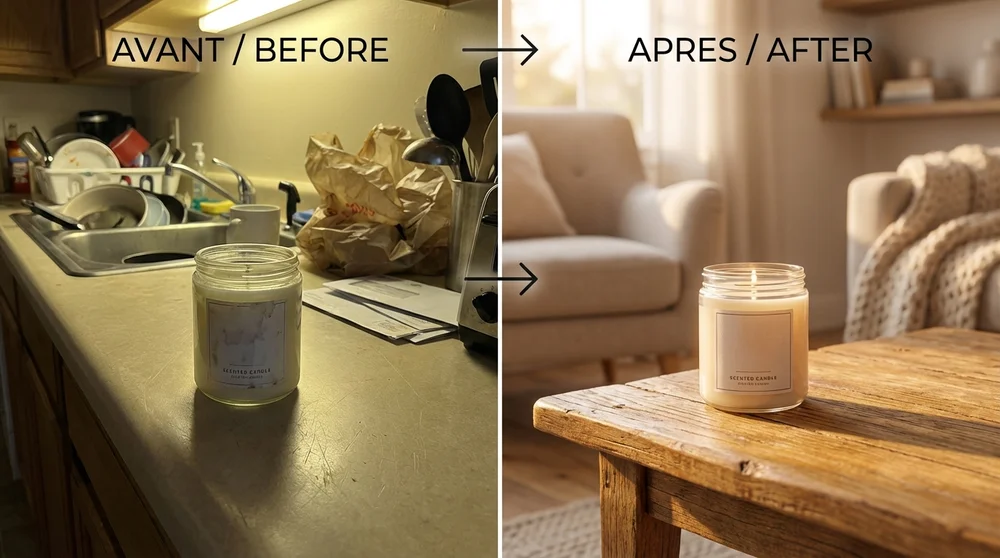
Avant : photo smartphone basique. Apres : image professionnelle generee par IA
Optimiser vos images pour chaque marketplace
Amazon : les exigences techniques
Amazon a des regles strictes pour les images produit. Une non-conformite peut entrainer la suppression de votre listing.
| Exigence Amazon | Specification | Capacite YourRender |
|---|---|---|
| Fond image principale | Blanc pur (255,255,255) | Automatique |
| Resolution minimum | 1000 pixels | Jusqu'a 4K |
| Format fichier | JPEG, PNG, GIF, TIFF | Tous supportes |
| Occupation du cadre | 85% minimum | Ajustable |
| Texte/logo sur image principale | Interdit | Options sans texte |
Workflow optimise pour Amazon :
- Generez l'image principale (fond blanc, style "E-commerce")
- Generez 4-5 images secondaires (lifestyle, details, mise en situation)
- Exportez en haute resolution (minimum 2000 pixels recommande)
- Nommez vos fichiers : ASIN.MAIN.jpg, ASIN.PT01.jpg, etc.
Shopify : maximiser les conversions
Shopify laisse plus de liberte creative, mais certaines pratiques augmentent les ventes :
Structure d'images recommandee par produit :
- Image principale : fond neutre, produit centre
- Image lifestyle : produit en contexte d'utilisation
- Image de detail : zoom sur la qualite/texture
- Image d'echelle : produit avec reference de taille
- Image variante : autres couleurs/options disponibles
Astuce conversion : Les boutiques Shopify avec photos lifestyle voient leurs conversions augmenter de 20-35% par rapport aux photos fond blanc seules.
Etsy : se demarquer visuellement
Sur Etsy, l'ambiance et l'authenticite priment. Les acheteurs cherchent des produits uniques avec une histoire.
Ce qui fonctionne sur Etsy :
- Fonds textures (bois, lin, marbre)
- Eclairage naturel chaleureux
- Mise en scene "handmade" authentique
- Coherence visuelle entre tous vos produits
Conseil Scene Builder pour Etsy :
Utilisez les styles "Lifestyle cosy" ou "Artisanal" plutot que "Studio epure".
Cas pratiques par type de produit
Cosmetiques et soins
Defis specifiques :
- Reflets sur les packagings brillants
- Textures difficiles a capturer (cremes, poudres)
- Ambiance "beaute" a creer
Reglages recommandes :
- Style : Luxe minimaliste ou Spa naturel
- Fond : Marbre blanc, surfaces organiques
- Lumiere : Douce, flatteuse, pas de reflets durs
Bijoux et accessoires
Defis specifiques :
- Taille reelle difficile a percevoir
- Brillance et reflets complexes
- Details fins a valoriser
Reglages recommandes :
- Style : Luxe elegant ou Lifestyle porte
- Fond : Velours, bois sombre, main/buste pour l'echelle
- Lumiere : Directionnelle pour creer des eclats
Vetements et mode
Defis specifiques :
- Rendu des textures (coton, soie, cuir)
- Forme du vetement a plat vs porte
- Coherence de collection
Reglages recommandes :
- Style : Studio mode ou Lifestyle urbain
- Fond : Neutre uni pour collection, lifestyle pour pieces phares
- Lumiere : Studio pour details, naturelle pour ambiance
Alimentation et boissons
Defis specifiques :
- Aspect appetissant crucial
- Couleurs fideles importantes
- Contexte de consommation
Reglages recommandes :
- Style : Gastronomique ou Kitchen lifestyle
- Fond : Table dressee, ingredients, ustensiles
- Lumiere : Naturelle chaude, "golden hour"
Calculer votre retour sur investissement
Cout reel de la photographie traditionnelle
Photographe professionnel e-commerce :
- Tarif jour : 300-800EUR
- Nombre de photos/jour : 20-50 produits
- Cout par produit : 15-40EUR
- Retouches supplementaires : 5-15EUR/image
- Total moyen : 20-55EUR par produit
Studio photo e-commerce :
- Location studio + equipement : 200-500EUR/jour
- Photographe : 300-500EUR/jour
- Post-production : 100-300EUR
- Total pour 30 produits : 600-1300EUR soit 20-43EUR/produit
Cout avec YourRender.ai
| Plan | Prix mensuel | Credits | Cout par image* | Ideal pour |
|---|---|---|---|---|
| Gratuit | 0EUR | 150 | - | Test (6 images) |
| Starter | 19,90EUR | 2000 | ~0,24EUR | Petite boutique |
| Pro | 49,90EUR | 5000 | ~0,24EUR | Boutique active |
| Agency | 99,90EUR | 10000 | ~0,24EUR | Catalogue important |
*Base sur 24 credits par image (Nano Banana Pro 1K-2K)
Consultez notre page tarifs pour plus de details.
Exemple de calcul ROI
Scenario : Boutique Shopify avec 50 produits, 4 images par produit = 200 images necessaires
| Methode | Cout | Delai | Modifications |
|---|---|---|---|
| Photographe pro | 4000-11000EUR | 2-4 semaines | Payantes |
| YourRender Pro | 49,90EUR/mois | 3-4 heures | Illimitees |
Economie annuelle : 3950-10950EUR pour une mise a jour complete du catalogue.
ROI supplementaire : Les images professionnelles augmentent les conversions de 30-60%. Sur un CA de 50 000EUR/an, meme une amelioration de 20% represente 10 000EUR de ventes additionnelles.
Creer un workflow de production efficace
Pour un catalogue de 10-50 produits
Temps estime : 1-2 heures
Preparation (15 min)
- Rassemblez toutes vos photos sources
- Triez par categorie de produit
- Verifiez la qualite (nettete, eclairage)
Generation par lot (30-60 min)
- Uploadez les produits par categorie
- Appliquez les memes reglages Scene Builder par categorie
- Generez 2-3 variantes par produit
Selection et export (15-30 min)
- Choisissez la meilleure variante
- Exportez en haute resolution
- Organisez par produit/marketplace
Pour un catalogue de 100+ produits
Temps estime : 4-8 heures (vs 2-3 semaines en traditionnel)
Organisation prealable
- Creez un tableur : nom produit, categorie, style souhaite
- Standardisez vos photos sources
- Definissez 3-4 templates de style
Production par batch
- Traitez par categorie (tous les bijoux, puis tous les vetements)
- Utilisez les memes reglages pour la coherence
- Generez en serie
Controle qualite
- Verifiez chaque image generee
- Regenerez les insatisfaisantes
- Exportez et organisez
Astuce productivite : Avec le plan Agency (10 000 credits/mois), vous pouvez traiter jusqu'a 400 images/mois a ~0,24EUR piece.
Questions frequentes
Debutant
L'IA peut-elle vraiment rivaliser avec un photographe professionnel ?
Pour 80% des besoins e-commerce, oui. L'IA genere des images de qualite studio, adaptees aux exigences des marketplaces. Pour des shootings tres specifiques (mannequins reels, packshots techniques complexes), le photographe reste pertinent. Mais pour le fond blanc Amazon, le lifestyle Shopify ou l'ambiance Etsy, l'IA produit des resultats equivalents ou superieurs.
Quelle qualite de photo source faut-il ?
Une photo smartphone recent (2020+) suffit. L'important : nettete du produit, eclairage correct (evitez les ombres dures), produit bien visible. Resolution minimum recommandee : 1000x1000 pixels.
Combien de temps pour creer une image ?
10-15 secondes de generation. En comptant l'upload et le parametrage, comptez 2-3 minutes par produit pour un debutant, moins d'une minute pour un utilisateur habitue.
Les images generees sont-elles libres de droits ?
Oui. Les images que vous generez vous appartiennent entierement. Vous pouvez les utiliser commercialement sans restriction sur tous vos canaux de vente.
Intermediaire
Comment maintenir une coherence visuelle entre tous mes produits ?
Sauvegardez vos reglages Scene Builder favoris. Utilisez les memes parametres (style, fond, lumiere) pour toute une categorie de produits. La coherence visuelle renforce votre image de marque.
Puis-je modifier une image apres generation ?
Vous pouvez regenerer avec des parametres differents (illimite). Pour des retouches fines (ajuster un detail specifique), exportez l'image et utilisez un editeur externe, ou utilisez le mode "Photo Editing" de Nano Banana Pro.
Comment gerer les produits avec variations (couleurs, tailles) ?
Generez une image de reference avec vos meilleurs reglages. Puis appliquez les memes parametres a chaque variation. L'IA s'adapte a la couleur/forme du produit tout en maintenant le style coherent.
Quelle resolution choisir ?
- Standard (1K-2K) : parfait pour le web, 24 credits
- Haute resolution (4K) : pour impression ou zoom detaille, 41 credits
Pour l'e-commerce, la resolution standard suffit dans 90% des cas.
Avance
Comment integrer YourRender dans mon workflow Shopify existant ?
- Exportez votre catalogue Shopify en CSV
- Generez les images dans YourRender par lot
- Nommez les fichiers selon votre convention Shopify
- Importez via CSV avec les nouvelles URLs d'images
Pour les catalogues importants, l'API YourRender permet une automatisation complete.
Quel est le ROI moyen constate apres migration vers l'IA ?
Les commercants rapportent en moyenne :
- 87% signalent une augmentation de revenus
- 94% constatent une baisse des couts operationnels
- 30x plus rapide pour le lancement de nouveaux produits
- 30-60% d'amelioration du taux de conversion
L'IA peut-elle creer des videos produit ?
Oui. YourRender integre VEO 3.1, le modele video de Google. Vous pouvez transformer une image produit en video de 5-10 secondes, ideale pour les Stories Instagram ou les listings Amazon enrichis.
Conclusion
Points cles a retenir
- La photographie produit par IA reduit vos couts de 60-80% par rapport a la methode traditionnelle
- Le Scene Builder permet de creer des photos professionnelles sans aucune competence technique
- Chaque marketplace (Amazon, Shopify, Etsy) a ses exigences specifiques - l'IA s'adapte a chacune
- Un investissement de 0,24EUR par image peut generer des milliers d'euros en conversions additionnelles
- Le temps gagne vous permet de vous concentrer sur ce qui compte : developper votre activite
Passez a l'action
Vous avez maintenant toutes les cles pour creer des photos produit professionnelles avec l'IA. La prochaine etape ?
Testez gratuitement avec 150 credits offerts : creez votre compte sur YourRender.ai et generez vos premieres images en quelques minutes.
Pas de carte bancaire requise. Pas d'engagement. Juste des photos produit professionnelles qui font vendre.


