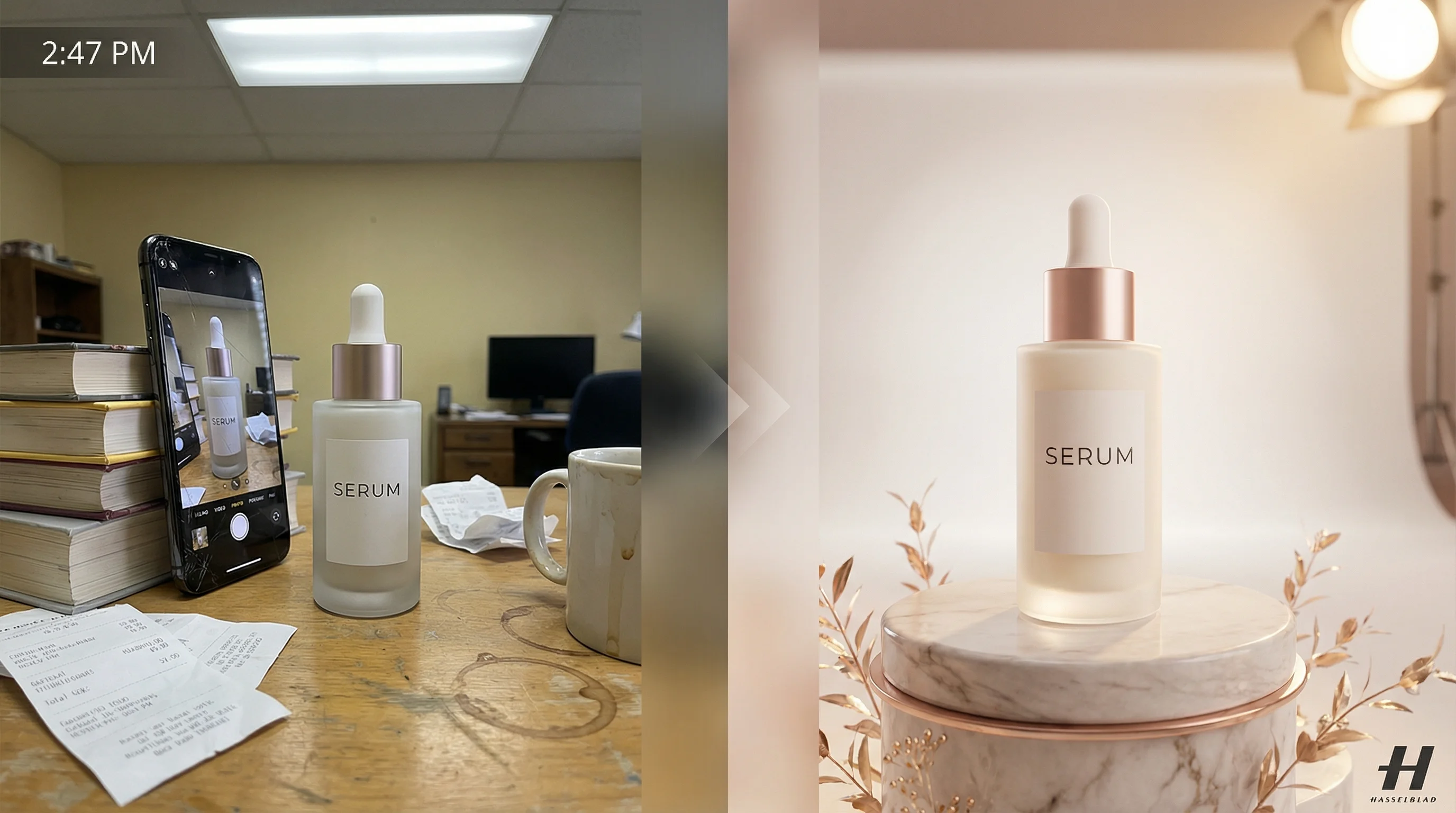
Votre téléphone fait des photos correctes. La boutique en ligne de votre concurrent, elle, affiche des visuels studio qui font vendre. L'écart entre vous deux n'est plus une question de budget — c'est une question d'outils.

Pendant des années, la photographie produit professionnelle était réservée à ceux qui pouvaient se payer un studio (500 à 2 000 € la session), un photographe, et des semaines de post-production. Aujourd'hui, avec l'intelligence artificielle, ce même résultat est accessible en 60 secondes depuis n'importe quel appareil — smartphone inclus.
Cet article vous montre exactement comment passer d'une photo brute prise avec votre téléphone à une image de catalogue professionnelle, étape par étape, sans aucune compétence technique préalable.
📱 Video : du smartphone au catalogue en 60 secondes
Démonstration complète : une photo smartphone transformée en visuel professionnel avec YourRender.ai
💡 Niveau 1 — Comprendre le problème réel

Pourquoi vos photos produits ne convertissent pas
93 % des consommateurs considèrent les visuels comme le facteur déterminant de leur décision d'achat (source : Justuno). Ce chiffre n'est pas une surprise — vous le savez instinctivement. Quand vous faites du shopping en ligne, vous passez d'abord devant les images, pas le texte.
Le problème pour les indépendants, créateurs et petites boutiques : la photographie professionnelle coûte cher, prend du temps, et ne passe pas à l'échelle. Vous lancez 10 nouveaux produits ce mois-ci ? Ça représente potentiellement 5 000 à 10 000 € de sessions photo.
Les 3 problèmes classiques de la photo smartphone :
| Problème | Impact sur les ventes |
|---|---|
| Fond inadapté (tapis, bureau encombré) | Produit noyé dans le bruit visuel |
| Éclairage naturel inconsistant | Photos incohérentes d'un produit à l'autre |
| Pas d'ambiance lifestyle | Difficile d'imaginer l'objet "dans la vraie vie" |
22 % des retours e-commerce sont dus à des photos qui ne correspondent pas au produit réel (source : Narvar). Autrement dit, de mauvaises photos coûtent de l'argent deux fois : d'abord en ventes perdues, ensuite en retours coûteux.
Ce qu'est la photographie produit par IA (définition claire)

La photographie produit par IA est une technologie qui utilise l'intelligence artificielle pour générer automatiquement des images de produits professionnelles sans studio physique.
Le processus simplifié :
- Vous importez votre photo produit (qualité smartphone suffisante)
- L'IA supprime l'arrière-plan automatiquement (suppression d'arrière-plan automatique = isolation automatique du produit)
- Vous choisissez un style (studio blanc, lifestyle, outdoor, luxe...)
- L'IA génère une image professionnelle en 10 à 30 secondes
Aucune compétence en design n'est requise. Aucun équipement spécialisé nécessaire.
⚡ Niveau 2 — Le workflow en 4 étapes
Étape 1 : Prendre la bonne photo avec votre smartphone
L'IA fait des miracles, mais une bonne photo de départ donne de meilleurs résultats. Voici ce qui compte vraiment :
Ce qui importe :
- Fond neutre : un mur blanc, un drap clair, une feuille de papier. L'IA retire le fond de toute façon, mais un fond contrasté facilite le travail.
- Lumière naturelle : placez-vous près d'une fenêtre. Évitez le flash direct (il aplati les textures).
- Produit propre : essuyez les traces de doigts, dépoussiérez.
- Cadrage simple : centrez le produit, laissez de la marge autour.
Ce qui n'importe pas :
- La résolution de l'appareil (même un iPhone 8 suffit)
- L'heure de la journée (la lumière sera régénérée par l'IA)
- L'arrière-plan (il sera supprimé)

Infographie : les 4 étapes pour transformer une photo smartphone en visuel professionnel
Étape 2 : Importer sur YourRender.ai
Rendez-vous sur l'application YourRender.ai. L'interface est conçue pour être utilisée sans formation préalable.
- Cliquez sur "Importer un produit"
- Sélectionnez votre photo (JPG, PNG ou WebP jusqu'à 10 Mo)
- L'IA détecte automatiquement votre produit
La suppression d'arrière-plan se fait automatiquement — vous n'avez rien à faire manuellement.
Étape 3 : Utiliser le Scene Builder (sans écrire une seule ligne de prompt)
Le Scene Builder est l'outil qui distingue YourRender des autres générateurs d'images IA. Il traduit vos objectifs marketing en instructions techniques pour l'IA — sans que vous ayez besoin de comprendre le prompt engineering (l'art d'écrire des instructions précises pour guider l'IA).
Concrètement : vous sélectionnez votre objectif, le Scene Builder s'occupe du reste.
| Objectif marketing | Ce que génère le Scene Builder |
|---|---|
| E-commerce (fond blanc Amazon/Shopify) | Fond blanc pur #FFFFFF, éclairage studio diffus |
| Lifestyle (produit en situation) | Scène réaliste avec contexte d'usage |
| Hero shot (publicité, bannière) | Éclairage dramatique, mise en valeur maximale |
| Réseaux sociaux | Composition optimisée format carré/portrait |
Exemple concret : Une vendeuse Etsy de bougies artisanales importe sa bougie sur fond de serviette de cuisine. Elle sélectionne "Lifestyle → Cozy home". En 20 secondes, la bougie apparaît sur une table en bois brut, avec une couverture en laine en arrière-plan flou. La même photo, envoyée à un photographe, aurait coûté 150 €.
Testez maintenant — résultat en 60 secondes
Importez la photo d'un de vos produits et voyez le résultat immédiatement. Aucune carte bancaire requise pour commencer.
Étape 4 : Générer et télécharger
Une fois votre style sélectionné :
- Cliquez sur "Générer"
- L'IA produit l'image en 10 à 30 secondes
- Visualisez le résultat, ajustez si nécessaire
- Téléchargez en haute résolution (jusqu'à 4K)
Conseil pro : Générez 3 à 5 variations du même produit. Les tests A/B montrent régulièrement des écarts de 15 à 30 % sur les taux de conversion selon le style visuel choisi.
📊 Presentation complète (slides)


🎙️ Podcast : l'IA redéfinit la photo produit
Discussion approfondie : comment l'IA transforme l'accès à la photographie professionnelle pour les créateurs indépendants
📈 Niveau 3 — Optimiser pour chaque plateforme
Amazon : les exigences exactes et comment les respecter
Amazon impose des règles strictes pour les images produits. Voici les exigences officielles et comment YourRender les respecte automatiquement :
| Exigence Amazon | Standard | Capacité YourRender |
|---|---|---|
| Fond de l'image principale | Blanc pur (RVB 255,255,255) | ✅ Automatique avec Scene Builder |
| Résolution minimale | 1 000 px côté le plus court | ✅ Jusqu'à 4 096 px (4K) |
| Format de fichier | JPEG, PNG | ✅ Les deux supportés |
| Remplissage du cadre par le produit | 85 % minimum | ✅ Ajustable via les paramètres |
Calcul ROI pour un vendeur Amazon :
Scénario : catalogue de 50 produits, 4 images par produit = 200 images nécessaires
| Méthode | Coût | Délai | Qualité |
|---|---|---|---|
| Service photo Amazon | 2 000–4 000 € | 2–3 semaines | Élevée |
| Photographe local | 1 500–3 000 € | 1–2 semaines | Variable |
| YourRender.ai plan Starter | 19,90 €/mois | 2–3 heures | Élevée |
Économie avec YourRender : 1 480 à 3 980 € sur la première mise à jour du catalogue.
Shopify : du catalogue de photos au flux de conversion
Les images produits influencent 75 % des décisions d'achat en ligne. Pour un store Shopify, chaque image est un argument de vente silencieux.
Workflow recommandé pour une boutique Shopify :
- Exportez la liste de vos produits depuis Shopify
- Photographiez chaque produit avec votre smartphone (fond neutre)
- Importez par lot sur YourRender.ai
- Générez 3 variations par produit (fond blanc, lifestyle, hero)
- Téléchargez en WebP pour des temps de chargement optimaux
- Réimportez via CSV dans Shopify
Résultats attendus : augmentation de 20 à 35 % du taux de conversion sur les pages produits, selon les données de la plateforme Shopify.
Contenu social : créer un mois de visuels en 2 heures
Les créateurs de contenu qui produisent 20 à 50 posts par semaine ont besoin de vitesse et de cohérence. Voici comment générer un mois entier de visuels produits en moins de 2 heures :
Planning de session (90 minutes) :
| Temps | Action |
|---|---|
| 0–15 min | Photographier tous les produits du mois (fond neutre, lumière fenêtre) |
| 15–30 min | Import par lot, sélection du style par objectif |
| 30–75 min | Génération des images (3–5 variations par produit) |
| 75–90 min | Sélection, téléchargement, organisation par plateforme |
Coût total avec le plan Découverte (4,90 €/mois) : environ 0,08 € par image en Simple Studio (8 crédits par génération).
Prêt à passer au niveau supérieur ?
La page Premium Studio donne accès à Nano Banana Pro — le générateur d'images propulsé par Gemini 3 Pro de Google, capable de produire des images jusqu'en 4K avec un rendu photoréaliste. Disponible à partir du plan Pro (49,90 €/mois).
📚 Ressources complémentaires
- Explorer les sources dans NotebookLM
- Studio Premium YourRender.ai
- Tarifs et plans
- Commencer à générer
❓ FAQ
Quelle qualité de photo faut-il pour obtenir de bons résultats ?
Une photo correctement exposée et nette suffit — même prise avec un smartphone d'entrée de gamme. L'IA régénère l'environnement (fond, éclairage, ambiance) autour de votre produit. La qualité du produit lui-même dans la photo est le seul facteur vraiment important.
Combien de temps faut-il pour générer une image ?
Selon le modèle choisi : de 10 secondes (Simple Studio) à 30 secondes (Nano Banana Pro en 4K). La génération vidéo prend entre 2 et 5 minutes.
Est-ce que YourRender fonctionne pour tous types de produits ?
Oui — bijoux, vêtements, cosmétiques, alimentaire, électronique, mobilier, articles artisanaux. Chaque catégorie bénéficie de styles adaptés dans le Scene Builder.
Puis-je utiliser les images générées pour mes ventes Amazon et Shopify ?
Oui. Vous détenez les droits complets sur les images générées avec votre compte. Elles peuvent être utilisées pour toute finalité commerciale — marketplaces, réseaux sociaux, sites web, publicités.
Quelle résolution est disponible ?
Simple Studio : jusqu'à 1024 × 1024 px. Nano Banana Pro : jusqu'à 4096 × 4096 px (4K). Les deux formats dépassent les exigences minimales d'Amazon et Shopify.
Le plan gratuit permet-il de tester avant d'acheter ?
Oui. Le mode démo vous permet de tester le workflow complet avec des produits exemples, sans créer de compte ni renseigner une carte bancaire. Pour importer vos propres produits, un plan Découverte à 4,90 €/mois suffit.
Faut-il des compétences en design ou en IA ?
Non. Le Scene Builder traduit vos objectifs en instructions techniques. Vous n'écrivez aucun "prompt", vous ne configurez aucun paramètre complexe. C'est conçu pour être utilisé par des vendeurs, pas des développeurs.
Combien coûte une image générée ?
Selon le plan et le volume : le Simple Studio revient à environ 0,08 € par image (8 crédits par génération) sur tout plan payant. Nano Banana Pro coûte environ 0,24 € par image (24 crédits) en résolution standard, ou 0,41 € par image en 4K (41 crédits). Le plan Agency (99,90 €/mois pour 10 000 crédits) offre le coût par image le plus bas à grande échelle.
✅ Conclusion
Le fossé entre une boutique qui vend et une boutique qui lutte se joue souvent au premier regard — la première photo que voit un acheteur potentiel. Ce fossé n'est plus conditionné par un budget photo. Il est conditionné par la décision de s'outiller correctement.
Ce que vous pouvez faire aujourd'hui :
- Photographiez un produit avec votre smartphone
- Importez-le sur YourRender.ai
- Obtenez une image professionnelle en 60 secondes
- Comparez avec votre photo actuelle
Le reste suit naturellement.
Testez avec votre premier produit — téléversez une photo et voyez le résultat en 60 secondes →
Cet article, ses visuels et son podcast ont été produits avec YourRender.ai et les outils NotebookLM de Google. Vous aussi, créez du contenu professionnel en quelques minutes.